Part 1: Introduction and Architecture
Database Architecture
The lifecycle of a SQL query goes through a flow divided into two main blocks: the Front-end and the Back-end.
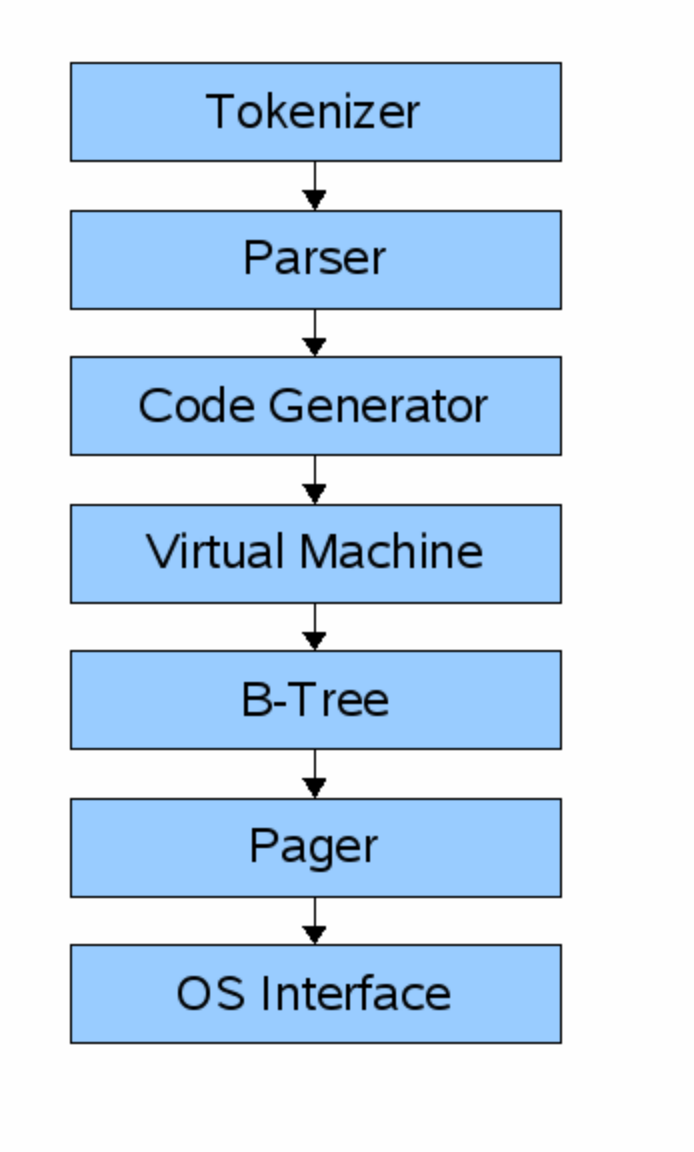
1. Front-end (Compilation)
Responsible for receiving the plain text query (SQL) and transforming it into instructions the machine can process.
- Tokenizer: Divides the SQL text string into individual tokens.
- Parser: Analyzes the grammatical structure of the tokens.
- Code Generator: Translates the structure into virtual machine bytecode.
- → Output: Bytecode (essentially a compiled program designed to operate on the database).
2. Back-end (Execution and Storage)
- Virtual Machine (VM): Receives the bytecode generated by the Front-end. It functions structurally like a giant
switchstatement that evaluates which type of instruction to execute on the data. - B-Tree: The main data structure where tables and indexes reside. It consists of multiple nodes, where each node is exactly the size of one page. The VM interacts with the B-Tree, which in turn communicates with the Pager.
- Pager: The memory and disk management layer.
- Receives commands from the B-Tree to read or write pages.
- Maintains an in-memory (RAM) cache of recently accessed pages.
- Is solely responsible for deciding when to write that memory back to the file on disk at the appropriate offsets.
- OS Interface: The layer that interacts directly with the host operating system. (In this C project, cross-platform support will be omitted to keep the code simple).
Next Step: Implement the REPL (Read-Execute-Print-Loop) in C.
Building the REPL (Read-Execute-Print-Loop)
The Core Loop
To interact with the database, we need a command-line interface that runs continuously. The main function relies on an infinite while (true) loop that performs three distinct steps:
- Print a prompt to the user (
db >). - Read a line of input from standard input (
stdin). - Execute the command, or print an error if the input is unrecognized.
State Management: InputBuffer
Instead of using raw variables, we encapsulate the input state within a wrapper struct:
typedef struct {
  char* buffer;
  size_t buffer_length;
  ssize_t input_length;
} InputBuffer;- buffer: A pointer to the dynamically allocated memory where the input string resides.
- buffer_length: The total allocated size of the buffer in memory.
- input_length: The actual number of bytes read from the user input.
Memory Management & getline()
The core of the input reading relies on the standard library function getline(): C
ssize_t getline(char **lineptr, size_t *n, FILE *stream);- Dynamic Allocation: If lineptr (our buffer) is set to NULL, getline() automatically allocates enough memory (malloc) to hold the entire line of input.
- Signed Size (ssize_t): The function returns a ssize_t instead of a regular size_t. This allows it to return a positive byte count on success, or a negative value (-1) if it fails to read the input.
- Trailing Newline Handling: getline() captures the \n character when the user presses Enter. We must manually remove it by replacing the last character with a null terminator: input_buffer→buffer[bytes_read - 1] = 0;.
- Memory Cleanup: Because getline() handles memory allocation internally, we must explicitly call free() on the buffer before exiting the program to prevent memory leaks.
Meta-Commands
Currently, the database recognizes a single meta-command:
.exit: Frees the allocated InputBuffer memory and terminates the program successfully (EXIT_SUCCESS).